

What it is#
When an assistant answers with an article of a decree or a passage of an arbitral award, the next thing you want is to see it in the original document. Until today that meant downloading the PDF and finding the page by hand.
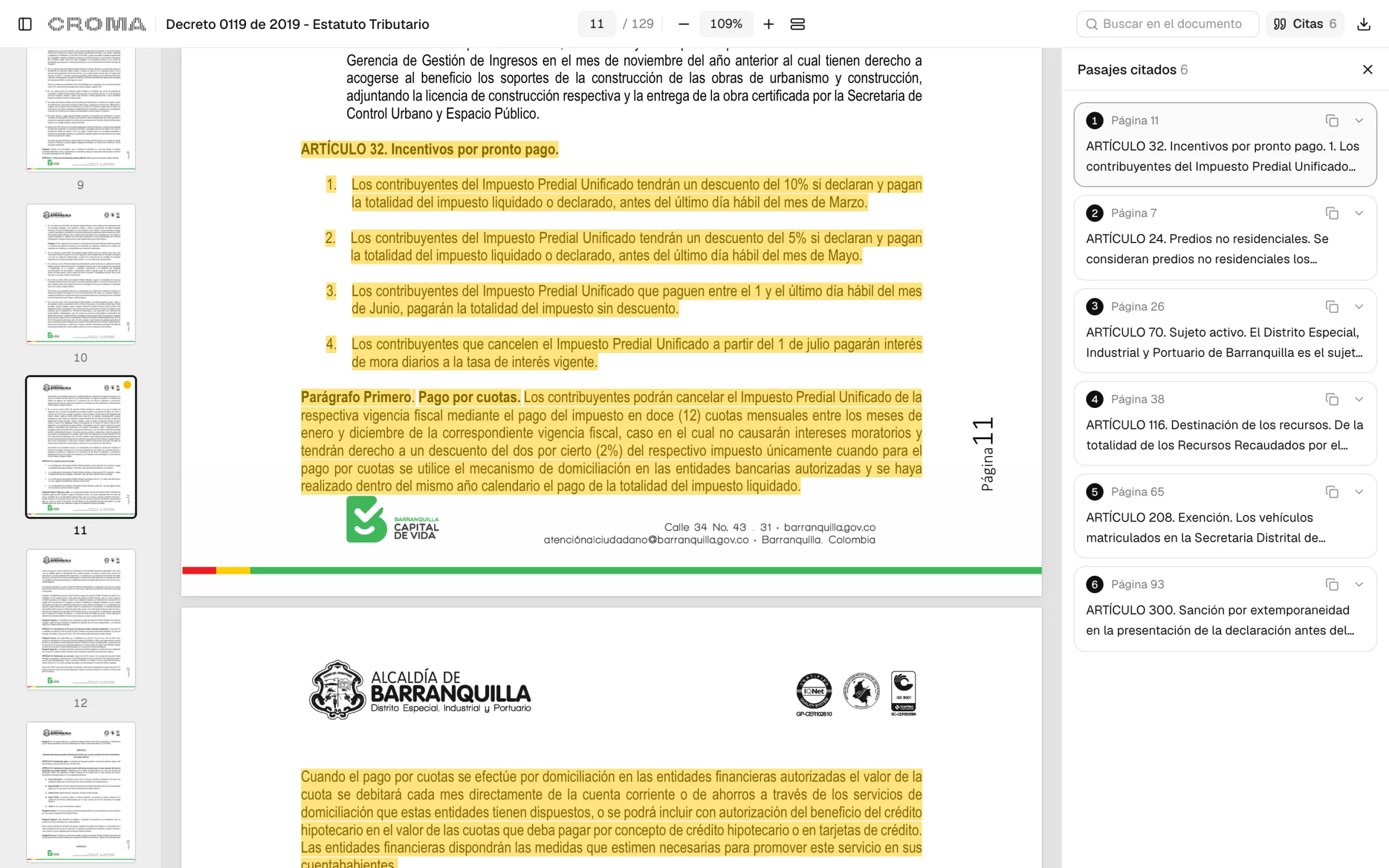
From today the answer carries a link to Croma Viewer. Open it and the document appears on the exact page, with the passage highlighted.
What you can do#
- Read the whole document, not just the excerpt: scroll up and down for the context.
- Open several citations in one link. They are listed at the side, each with its page.
- Jump from one citation to the next with a click or with the up and down arrows.
- Copy the text of a citation.
- Search inside the document and move through the page thumbnails.
If the document is a scan, the citation is shown as text beside the page instead of highlighted on it.
Where it is#
For now in two sources from Colombia: municipal tax regulations and the arbitral awards of the Bogotá Chamber of Commerce. Every search result and every passage carries its viewer_url, in the API and in the MCP server. To cite several passages of the same document, add &cite=<start>-<end> for each one.
The link opens with your Croma session. If you are not signed in, it asks you to and brings you back to the document.
We will keep adding the other sources that publish documents.